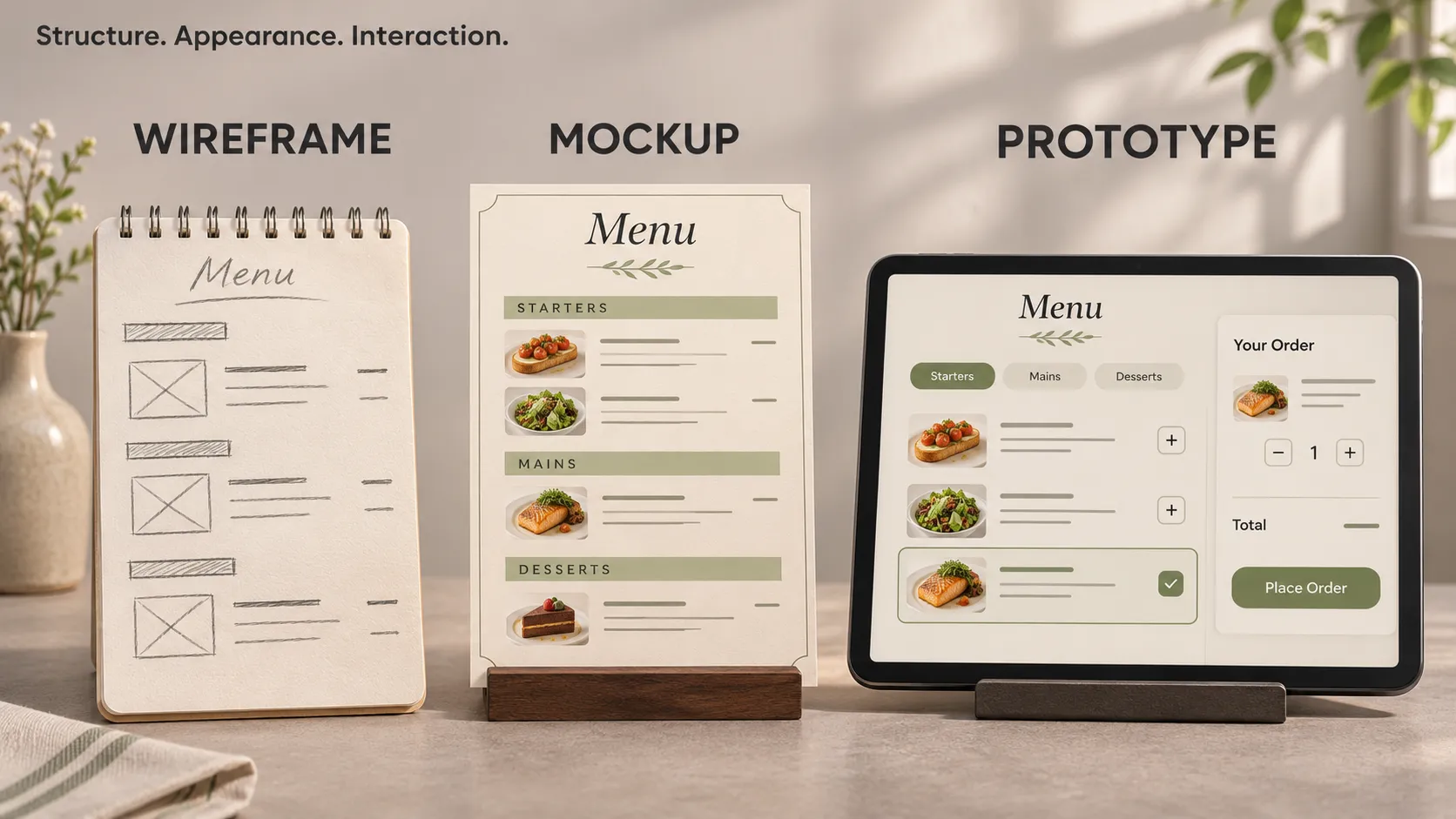
A wireframe shows how a screen is organised. A mockup shows its proposed visual design. An interactive prototype lets someone try a planned sequence of actions.
These deliverables help answer different questions before and during app development. Confusing them can lead to misunderstandings: a founder expects a working application, a designer delivers clickable screens, and a developer still needs to define what happens behind those screens.
To understand the difference, imagine an app that lets someone book an appointment. We will follow that same feature from a rough layout to a testable experience.
The Difference in Everyday Terms
Think about preparing a restaurant menu.
- The wireframe is a rough arrangement of sections: starters first, main courses next, prices beside each item.
- The mockup shows the proposed menu with its actual typography, colours, descriptions and photographs.
- The interactive prototype rehearses the ordering experience: choose a dish, select an option, review the order and confirm.
The rehearsal can show whether someone understands how to order. It does not demonstrate that the kitchen receives the order or that a payment has been processed.
The same distinction applies to an app. Structure, appearance, interaction and working infrastructure are related, but they require different kinds of evidence.
What Is a Wireframe?
A wireframe is a simplified representation of a screen’s layout and content structure. It helps a team decide what information belongs on the screen and which actions should be easiest to find.
It often uses plain boxes, short labels and minimal decoration. You can draw one on paper or create it in a digital design tool.
A wireframe might show:
- The screen title and main navigation.
- Important information and its order.
- Form fields, lists and buttons.
- The relationship between primary and secondary actions.
- Notes explaining behaviour that a static drawing cannot show.
Its value comes from making decisions visible while the layout is still easy to change.
Our Booking App as a Wireframe
Suppose someone wants to book a haircut. An initial wireframe might place the service selector at the top, a calendar underneath, available appointment times below that, and a Continue button at the bottom.
Reviewing this layout exposes a product question: can the app show available times before the customer chooses a service? A haircut and a colouring appointment may require different amounts of time.
That question affects the booking logic. Moving the service choice earlier may make the experience clearer and prevent the app from showing unsuitable appointments.
This is useful wireframe feedback. Choosing the exact shade of the Continue button can wait until the underlying sequence makes sense.
What Is a Mockup?
A mockup is a static representation of the proposed visual interface. It shows how the screen should look with more developed styling and content.
Compared with an early wireframe, a mockup usually includes more detail:
- Typography, colours and spacing.
- Icons, illustrations or photographs.
- Realistic labels, descriptions and example data.
- The appearance of buttons, fields and navigation.
- Visual treatments for selected, disabled or unavailable items.
A mockup can show several screens or states. It remains static unless interactions are added.
Our Booking App as a Mockup
The appointment screen now contains a real service name, a duration, a displayed price and a readable calendar. Available times look selectable, while unavailable times have a distinct treatment.
This helps the team review questions that rough boxes could not answer:
- Can customers distinguish an available time from the currently selected time?
- Is the appointment summary easy to read?
- Does a long service name fit without hiding important details?
- Is the main action visually clear?
Use realistic content early enough to reveal these problems. A layout that works with “Service A” may struggle with “Consultation and personalised treatment plan”.
A mockup also supports an initial visual accessibility review, including contrast and text presentation. It cannot establish how the implemented app behaves with a screen reader or enlarged system text.
What Is an Interactive Prototype?
An interactive prototype is a testable representation of a proposed experience that responds to actions such as taps, clicks or selections.
Instead of looking at separate screens, someone can move through a prepared journey. Depending on the tool and implementation, the prototype might support navigation, overlays, changing selections, form interactions or simulated loading states.
Some prototypes connect drawings or design screens. Others are built with code. Their scope depends on the question being investigated.
Our Booking App as an Interactive Prototype
The customer can now choose a haircut, select a date, pick an appointment time and open a review screen. From there, they can change their selection or confirm the booking.
The prototype can also include a prepared alternative: the chosen appointment becomes unavailable before confirmation. The customer must then choose another time.
This lets the team observe whether the person understands the message and can recover without restarting the entire journey.
However, a simulated confirmation screen does not establish that a real appointment exists. The prototype may simply move to the next prepared screen when someone taps Confirm.
Can a Wireframe Also Be a Prototype?
Yes. These terms describe overlapping characteristics rather than perfectly separate categories.
A wireframe describes the representation of a design. An interactive prototype describes how someone can interact with it.
Connect several rough wireframes with clickable actions and you have a low-fidelity interactive prototype. Connect detailed mockups and you have a visually richer prototype.
Fidelity means how closely a representation resembles the intended product. Visual detail and functional realism can vary independently:
- A polished screen may have no working interactions.
- A rough prototype may support an entire booking journey.
- A coded prototype may accept real input while using a temporary visual design.
When requesting a deliverable, explain what people must be able to do with it. “A prototype where customers can choose, change and confirm an appointment” is clearer than “a high-fidelity design”.
Do You Need All Three Before Development?
No. Choose the smallest useful deliverable for the uncertainty you need to resolve.
An unfamiliar booking journey may benefit from rough layouts, visual exploration and interaction testing. A small change to an established screen may only need an updated mockup and a clear description of the behaviour.
- Use wireframes when the information, screen structure or sequence is unclear.
- Use mockups when the main question concerns visual hierarchy, content presentation or interface consistency.
- Use an interactive prototype when you need to observe how someone moves through a task.
- Investigate with code or a technical experiment when the uncertainty concerns device capabilities, integrations or system behaviour.
You can also move backwards. If testing a detailed prototype reveals that the booking sequence is confusing, returning to a rough wireframe may be the quickest way to explore alternatives.
How to Test the Booking Prototype
Start with a research question, such as: “Can a new customer book an appointment and change their chosen time without assistance?”
Then give the participant a realistic goal:
You need a haircut next Tuesday after 4 pm. Find a suitable appointment and complete the booking.
Avoid instructions such as “Tap the calendar, select Tuesday and press Continue.” Those directions reveal the route you are trying to evaluate.
Observe where the participant hesitates, what they expect a control to do, and whether the review screen helps them recognise their selection. Ask them to explain what they believe has happened after confirmation.
Record specific observations. “The participant thought the appointment was booked before reaching the review screen” gives the team something concrete to investigate. “They liked the design” provides much less direction.
Distinguish design problems from prototype limitations. An unconnected Back button may interrupt the session because the prototype is incomplete, rather than because the navigation concept is confusing.
Successful task completion provides evidence about that tested experience. It does not establish future retention, willingness to pay or demand for the business.
Prototype vs Proof of Concept vs MVP
These deliverables address different uncertainties, even though a single experiment can sometimes serve more than one purpose.
An Interactive Prototype Explores the Experience
For the booking app, it helps investigate whether customers understand the sequence, recognise available times and recover from an unavailable appointment.
A Proof of Concept Investigates Feasibility
A proof of concept, or POC, could test whether an external scheduling system provides the availability data the app needs, or whether its API supports creating a reservation.
This experiment may have a minimal interface. Its purpose is to answer a technical question before the team commits to a larger implementation.
An MVP Delivers a Narrow, Usable Service
A minimum viable product allows actual customers to complete a meaningful journey. In this example, that means making a real booking with an appropriately supported process behind it.
The first release might serve one business, offer a limited set of services and omit loyalty features. Its booking confirmation still needs to correspond to a real outcome.
An interactive demo can help prepare an MVP. The demo itself does not become an MVP simply because it looks complete.
What Changes When Developers Build the App?
A prototype represents intended behaviour. Developers must turn that intention into working rules across the interface, application logic and supporting services.
Consider the unavailable appointment message. The prototype can display it on a prepared route. The implemented app must determine availability from the relevant system and handle a booking attempt correctly.
Other decisions include:
- What appears while availability is loading.
- What happens if the request fails.
- How the app prevents repeated confirmation attempts from creating duplicate bookings.
- Whether the selected service remains available after changing the date.
- How customers recover when confirmation cannot be completed.
In a Flutter application, these decisions become widgets, state, validation and asynchronous operations, connected to the relevant backend or external service.
A design file can communicate the intended result, but it does not automatically provide the implementation. GOV.UK’s guidance on making prototypes also distinguishes experimental prototype code from code suitable for production.
What Should Be Included in the Design Handoff?
A useful handoff gives developers enough context to understand the intended journey and identify unresolved questions.
For the booking feature, prepare:
- The agreed scope: which services, users and booking scenarios are included.
- The current design version: an identifiable reference with appropriate file access.
- The user flow: where the journey starts, how it progresses and how someone goes back.
- Relevant states: selected, unavailable, loading, empty, failed and confirmed.
- Behaviour notes: rules that cannot be understood from appearance alone.
- Prototype boundaries: which interactions work and which outcomes are simulated.
- Open questions: decisions still requiring product or technical input.
Bring developers into the discussion before considering the design finished. Their input can reveal missing data, platform constraints or integration requirements while changes are still manageable.
If you need more context on the design tool itself, read what Figma is used for in app development.
Frequently Asked Questions
Is a screenshot a mockup or a prototype?
A screenshot is a static image. It might show a mockup, a prototype or a working app, but the image alone does not establish how the underlying experience behaves.
Can you build a prototype without coding?
Yes. Design tools can connect screens and simulate interactions without application code. Whether that is sufficient depends on the behaviour you need to investigate.
Does an interactive prototype need every screen?
No. It needs enough coverage for the intended task. Define its boundaries so reviewers know whether a missing interaction is outside the experiment or an unresolved design decision.
Does approving the mockup mean the feature is fully specified?
No. Visual approval may leave data rules, failure handling and integration behaviour unresolved. Agree what approval covers and document the remaining decisions before implementation.
Turn the Design Into a Clear Development Scope
Before investing in more screens, identify the question your project needs to answer next. It may concern the layout, the customer journey or whether a required integration can work.
If you are preparing a mobile MVP, I can help clarify the user flow, technical constraints and scope of the first release. Explore my mobile development and technical expertise to see how I can support your project.